
Valorant Ping: Everything You Need to Know About Lag, Latency, and Smooth Gameplay
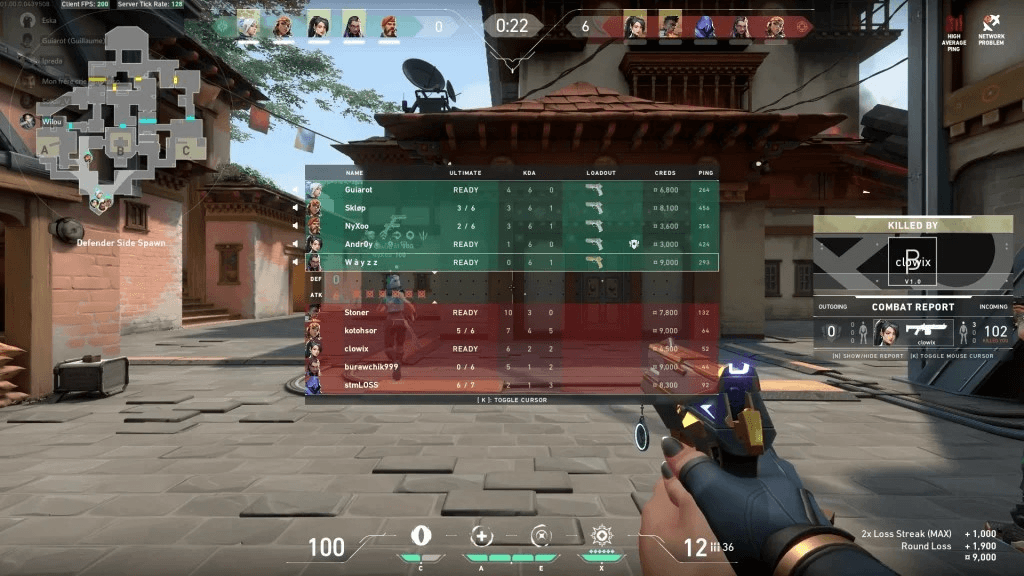
When it comes to competitive shooters, Valorant stands out as one of the most fast-paced and tactical games of its generation. Developed by Riot Games, it has quickly become a global sensation, drawing millions of players who thrive on precision shooting, team-based strategy, and quick reaction times. But no matter how skilled a player is, one issue can disrupt gameplay more than anything else: Valorant ping. Ping, measured in milliseconds (ms), represents the time it takes for data to travel between your device and the game server. In a competitive environment like Valorant, where the difference between winning and losing a duel can come down to fractions of a second, even minor increases in ping can cause frustrating delays. This delay manifests in missed shots, rubber-banding, and opponents appearing to move faster or teleport across your screen. Because of this, understanding what Valorant ping is, how it affects your performance, and most importantly, how to reduce it is essential for anyone serious about improving their experience in the game.
What is Valorant Ping and Why Does It Matter?
In simple terms, Valorant ping is the measure of latency between your computer and Riot Games’ servers. A lower ping translates to faster communication, meaning the server registers your movements, shots, and abilities more quickly. Typically, a ping of under 40ms is considered excellent, 40–60ms is good, 60–100ms is playable but not ideal, and anything above 100ms is problematic. The reason ping matters so much in Valorant is because of how precise the gameplay is. Unlike some casual shooters where delays are less noticeable, Valorant is designed around tactical precision, making every millisecond count. If your ping is high, you might find yourself shooting at enemies who are not actually there, losing fights you should have won, or experiencing delayed ability usage. This not only affects your personal performance but can also frustrate teammates in ranked matches, where coordination and reliability are essential.
How Valorant Ping Impacts Gameplay
High Valorant ping is one of the most frustrating obstacles for players because it undermines skill and preparation. The most obvious issue is input delay, where your actions feel sluggish compared to what’s happening on screen. For example, if you peek an angle and fire, the server may register your shot too late, allowing the enemy to eliminate you first even though you reacted faster on your screen. Another impact is on movement, where lag can cause rubber-banding, making your character snap back or teleport unexpectedly. Abilities are also affected, as smokes, flashes, or walls might deploy a split second later than intended, throwing off strategies and timing. Even worse, high ping often results in “desync,” where the server’s version of the game world does not match what you see on your screen, creating situations that feel unfair and confusing. For a game as competitive as Valorant, these issues can be demoralizing and make it nearly impossible to climb ranks effectively.
Common Causes of High Valorant Ping
Understanding what causes high Valorant ping is the first step to reducing it. One major factor is server distance. The farther you are from Riot’s dedicated servers, the longer data has to travel, naturally increasing latency. This is why players should always choose the closest server region available. Another common cause is local network congestion, which happens when multiple devices are using the internet simultaneously for streaming, downloading, or gaming. Wi-Fi connections also contribute significantly to higher ping because they are more prone to interference compared to wired Ethernet. Background processes such as automatic updates, file syncing, or streaming in the background can also eat up bandwidth, leaving less available for Valorant. Additionally, Internet Service Provider (ISP) issues, such as poor routing or limited bandwidth capacity, can consistently raise ping. In some cases, the problem lies with Riot’s servers themselves, particularly during peak hours or after major updates when demand surges.
How to Check Your Valorant Ping
Riot Games provides players with tools to check their Valorant ping directly in-game, which is essential for diagnosing issues. By going into the settings menu and enabling network stats, players can view real-time data on ping, packet loss, and jitter during matches. This feature is especially useful because it shows whether ping is stable or spiking at certain moments. Outside of the game, players can also use third-party ping test tools to measure latency to specific servers. Riot maintains a list of server IPs for different regions, which can be used to run manual ping tests through command prompt or external applications. This allows players to see which server provides the lowest ping and whether their ISP is routing traffic efficiently. Regularly monitoring ping helps players identify patterns, such as higher latency during specific hours, making it easier to troubleshoot and apply targeted fixes.
How to Reduce Valorant Ping
After identifying that your Valorant ping is too high, the next step is to apply solutions to bring it down. The most effective fix is switching from Wi-Fi to a wired Ethernet connection, which immediately stabilizes latency by removing wireless interference. Closing unnecessary background applications, such as browsers, streaming platforms, or downloads, ensures that more bandwidth is dedicated to the game. Players should also check that they are connected to the closest Riot server region, as choosing a distant server can dramatically increase ping. Restarting your router and modem regularly can refresh your connection and reduce network congestion. For advanced optimization, configuring router settings to prioritize gaming traffic (QoS) ensures smoother gameplay even when other devices are active. If these steps do not resolve the issue, contacting your ISP about routing problems or upgrading to a higher-speed plan may be necessary. In some cases, using a reputable gaming VPN can help reduce ping by providing a more efficient data route, though results vary by location.
Valorant Ping vs. Internet Speed
Many players mistakenly believe that having high-speed internet guarantees low Valorant ping, but this is not the case. Internet speed tests typically measure download and upload speeds, which determine how quickly data can move in large amounts, but not how fast small packets travel back and forth between your device and the game server. Ping specifically measures latency, which is separate from bandwidth. This means that a player can have fast internet with excellent download and upload rates but still struggle with high ping in Valorant if their ISP routes data inefficiently or if they are far from the servers. Understanding this distinction is key to troubleshooting lag, as focusing only on speed without checking ping can leave the root cause unresolved. A stable, low-latency connection is more important for Valorant than raw internet speed.
How Competitive Players Handle Valorant Ping
At the professional level, Valorant ping is treated as seriously as mechanics or strategy. Pro players and streamers often test their ping before entering matches, ensuring that they are connected to the lowest-latency server available. Many invest in high-quality routers, Ethernet connections, and dedicated internet lines to avoid interference from household devices. Competitive players also rely on consistent monitoring tools to track ping, jitter, and packet loss during practice sessions, allowing them to address problems before they escalate. For them, every millisecond of latency matters, and minimizing ping is part of their preparation alongside aim training and map review. Even casual players can learn from this approach by treating network optimization as an important step in improving their overall gameplay.
Can Valorant Ping Problems Be Out of Your Control?
Not all Valorant ping problems can be fixed by the player. In some cases, Riot’s servers may experience technical difficulties or overload during high-traffic times, causing widespread latency issues. These are temporary and typically resolved by the developers. Similarly, ISP routing problems are outside of player control, though contacting the provider to request a fix can sometimes help. During these situations, running ping tests can confirm whether the problem is local or external, saving time on unnecessary troubleshooting. Understanding that not all ping issues are your fault can reduce frustration and provide clarity when waiting for a solution.
Conclusion: Why Valorant Ping Matters More Than You Think
In the world of competitive shooters, milliseconds can mean the difference between victory and defeat, and Valorant is no exception. Valorant ping is one of the most important factors in ensuring smooth and responsive gameplay. Low ping allows your skill, strategy, and teamwork to shine, while high ping undermines even the best-prepared players. By understanding what ping is, how to monitor it, and most importantly how to reduce it, players can take control of their gaming experience. From switching to wired connections and closing background apps to selecting the right servers and optimizing router settings, there are many effective ways to minimize latency. While not all issues can be resolved at the player level, most common problems can be addressed with the right steps. Whether you are a casual player looking to enjoy smoother matches or a competitive gamer climbing the ranks, paying attention to Valorant ping is essential to reaching your full potential in the game.